Translate in place
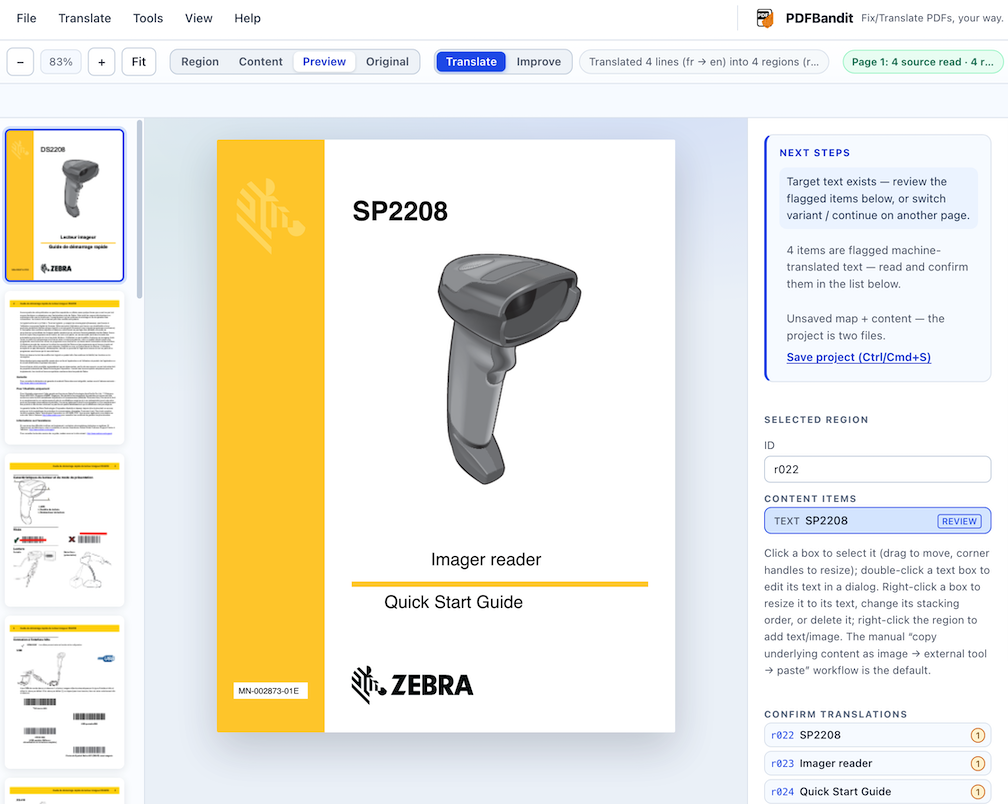
Map the regions that matter, translate them, and keep the page layout intact. Source text and translated text live in separate variants.
Local-first PDF repair & translation
Map a PDF once, then translate it, rebuild it, or add a selectable text layer — without rewriting the original file.
No install. No account. Your PDF stays in your browser.
Built around the document
PDFBandit separates what a PDF is from what you want to say, so translation and repair stay predictable.
Map the regions that matter, translate them, and keep the page layout intact. Source text and translated text live in separate variants.
Add an invisible text layer over scanned or image-only pages, so the document becomes searchable and copyable without changing how it looks.
The structure is shared. Each language or working copy gets its own content file, and switching variants never throws away edits.
Scanned-page text is read locally with Tesseract.js. OCR is lazy, opt-out, and never writes placeholder text when it fails.
Your PDF, map, and variants stay in this browser. There is no account, no upload queue, and no server-side copy of your document.
Build a reconstructed PDF, or export a digitalized copy with the source text embedded as a selectable layer. The original stays untouched.
A short path from PDF to result
No import wizard, no conversion queue. The editor opens the PDF directly in your browser.
Drop in a document. PDFBandit reads it locally and remembers the session in IndexedDB.
Draw or detect text and figure regions. Proposals stay proposals until you confirm them.
Translate into a target variant, or extract source text and make the page selectable.
Save the map and content separately, or export a finished PDF copy. The source file never changes.
Privacy is a design choice
PDFBandit runs in your browser. The document, its map, and its variants stay on your device unless you export them.
Open the editor and work on your document locally. No sign-up, no install, no source file rewritten.
Open PDFBandit